 notes.uart.sh
Working around Trilium's lack of share alias subpaths
The software I use to run this garden is Trilium. Trilium has a built-in “share notes” feature - if you have it running on a server, you can select notes to be shared publically, and they will automatically be given a public link that anyone can view, at (your trillium domain)/share/(random letters) (e.g. https://trilium.example.com/share/O9vlzZV9eqgS).
It's possible to change these random letters to your own alias by applying the #shareAlias attribute to the shared note, with the value being the name you want to use: so, #shareAlias="music" becomes https://trillium.example.com/share/music.
Seeing this, I thought to myself: “Great! I can use this to give human-readable URLs to my entire note structure!”
…until I noticed the following passage in the documentation:

/) within aliases to create subpaths is not supported.”Whoops. That means I can't do, say, https://trillium.example.com/share/music/production/lossy, it would have to be something like /music-production-lossy or something more awkward.
But this is Trilium we're talking about; perhaps the most customizable software I've ever had the pleasure of using. So I wasn't going to stop at that.
Actually, you can use slashes in aliases#
Despite what the documentation says, Trilium will happily let you put a slash in your alias! All of the links in the shared note will also be changed to match it.
However, if you actually click on one of the links, you'll see this error:
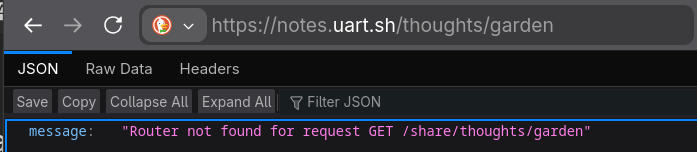
Fair enough. Trilium doesn't expect slashes in the alias, and its internal server is probably only configured to read /share/<alias>, and treats /share/<alias>/… as a separate URL match.
What if we force it to take the slash not as a literal slash, but as an URL-escaped one (so, just a “slash” character) instead?
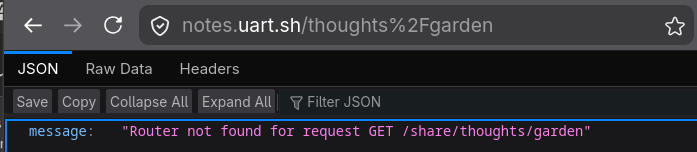
Same error, with the same path. Dang.
But in this case, the garden runs over a reverse proxy. I decided to see if the raw server exposed by Trilium itself would accept it:
$ curl localhost:8020/share/thoughts%2Fgarden
<!DOCTYPE html>
<html lang="en">
<head>
    <meta charset="utf-8">
    <meta name="viewport" content="width=device-width, initial-scale=1">
    <link rel="shortcut icon" href="../favicon.ico">
        <link href="assets/styles.css" rel="stylesheet">
        <link href="assets/scripts.css" rel="stylesheet">
(...)
That's my page! And if I scroll lower (not shown above), it indeed has the right page's content.
So, accessing a note with a slash in its alias is possible, but only if the slash is URL encoded. Obviously, that still isn't the perfect solution (I'd rather be able to write a regular slash instead), but it's a clear path to achieving it: we just need to get the reverse proxy to swap in the slash, and we're good.
Attempt 1 - rewriting the path#
You might've noticed that the error message above gives a path of /share/thoughts/garden, even though I only typed /thoughts/garden in the path.
This is because the garden runs behind Caddy, with an interesting configuration - the root (/) of notes.uart.sh serves the contents of /share directly, using Caddy's rewrite directive:
notes.uart.sh {
	rewrite /share{uri}
	reverse_proxy :8020
}
The raw Trilium server, without the rewrite, is proxied on another subdomain so that I can still have working sync.
Caddy's replacements are pretty flexible though, right? I tried the following:
(edit: I forgot to paste the code in, and I don't remember what was supposed to go here. Oops.)
But that just caused a 400 Bad Request on every page I visited. I assumed it changed the first slash in /share, so I figured I could change it with a regex - only match / if it's not followed by share. In any other language, say, Python, I could use a negative lookahead (/(?!share/))- but Go's regexes (and by extension, Caddy's regexes) do not support negative lookahead.
At this point I considered going back to Nginx, which would probably be able to do this without any fuss. Then I remembered how painful doing anything else in Nginx was and went back to troubleshooting Caddy.
I later found out that Caddy reorders rewrites internally. I tried the following config - making sure that the URI slashes get replaced before the rewrite:
notes.uart.sh {
    route {
        uri replace / %2F
        rewrite /share{uri}
    }
    reverse_proxy :8020
}
I also enabled debug logging in Caddy to see how it rewrites the URL. What I found was that the url-encoded slash (%2F) got replaced by a regular slash again ("uri":"/share/music/hyperpop-digicore") - so basically, nothing changed. It wasn't a matter of the replace not working - changing the slash to another character indeed made it work (and some, like single-quotes, were even URL-encoded!). I also tried uri path_regexp, with the same results.
I experimented a bit and found that this seems to be caused by the rewrite rule - because if I dropped it, the replace worked correctly: "uri":"%2Fmusic%2Fhyperpop-digicore"
(I generally found that uri and rewrite don't seem to mix together very well, so I dropped it from further experiments).
…a little too correctly. It also replaced the leading /, and besides, we lose the rewrite starting with /share. But we can reimplement it with another uri rule:
notes.uart.sh {
    route {
        uri replace / %2F
        uri path_regexp ^%2F /share/
    }
    reverse_proxy :8020
}
And lo and behold: it works! I get "uri":"/share/music%2Fhyperpop-digicore", and in my browser, I see the page:
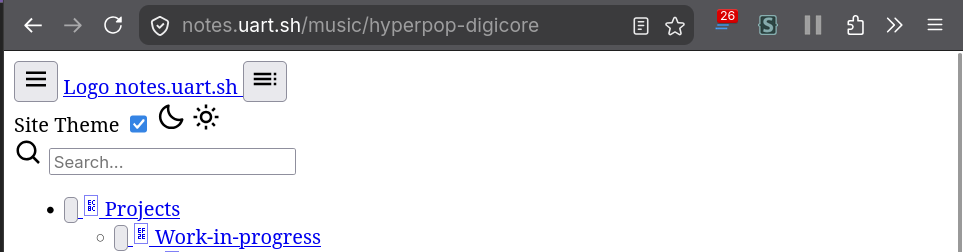
…except, there's no CSS. Turns out, Trilium tries to load assets like site CSS and JS from ./assets - which is implemented in the /share case, as /share/assets will happily return them, but with our new URL with a slash in it, that resolves to /share/media/assets which it does not know what to do with.
Also, we kind of replace all slashes, so the assets are now broken on all subpages. It also breaks calls to /api, which are used for custom styles and file links.
I ended up settling for the following solution:
notes.uart.sh {
    @assets path_regexp /(.*/)?assets/.*
    handle @assets {
        uri path_regexp ^/(.*/)?assets /share/assets
    }

    @api path /(.*/)?api/.*
    handle @api {
        uri path_regexp ^/(.*/)?api /share/api
    }

    handle {
        uri replace / %2F
        uri path_regexp ^%2F /share/
    }

    reverse_proxy :8020
}
…but that still left some stuff broken. Notably, calls to /api/… still returned 404s and I could see they still used the default handler - probably bad regex on my part.
Worst of all, though, all links to other pages were broken since they all use ./. I could use JavaScript to change them on the fly, but that seemed like a horrible solution because I don't want to force people to use JavaScript just to click on links.
This was as far as I got with the pure-Caddy solution.
Attempt 2 - trying to make the software do it#
I figured I didn't have any other choice but to look into Trilium's internals, and ended up producing a (somewhat poorly tested and written, as the automated AI review helpfully pointed out) patch to allow for slashes in share aliases, and to adapt the theme to it.
Midway through sending it, I realized it was kind of a hack. See, Trilium already has an HTML export feature that automatically generates subpaths based on the note structure. The caveat being that an export has to be done manually, as opposed to the share which Just Works.
I think if I were to design an upstream-ready solution, it would involve mirroring the paths that exports use, rather than the hacky path approach. For now, I just closed it.
Attempt 2.5 - technically the server-side patch isn't needed#
Really, what my patch does is three things:
- it modifies the route handler to accept slashes natively without the escaping trick (though we already estabilished I technically don't need that);
- it modifies the site rendering code - there are some paths to assets (CSS/JS/fonts) passed to the share template, and my patch modified these paths to resolve to the correct root path (by adding the appropriate amount of
../); - it modifies the share theme itself - changing the last remaining few cases of asset paths and links to notes that need to be adapted to have enough
../-es.
The first one - we can skip. The second one concerns variables passed to the template, and we can just choose to handle them differently on the template side.
As for the last one… so remember how I said Trilium is customizable? The share template is also customizable!