 notes.uart.sh
Achieving a crushed/MP3/degraded/lossily compressed sound
There are many different types of “low-quality, artifacted audio degradation” effects, achieved through different methods and giving wildly different results. These different effects often get conflated into “bitcrush”, which is inaccurate.
This page describes these effects in more depth, shows the differences between them, and shows which plugins you can use to get those effects in your songs.
Example non-crushed audio#
To compare these different effects, we'll use a short example track:
(Excuse the loud sibillant sounds in the vocal, this is an old demo from before I learned to use a de-esser…)
Bitcrush#
Bitcrush is the effect of fitting audio into a smaller amount of bits. (TODO better explanation)
The effect is not too different from how samples get crunched in video games for older hardware. It's pretty extensively used as the basis of the hexd genre.
dblue Crusher with the “Reduction” set to 4 samples; the last bar has the Reduction automated from 4 to the maximum value (128).
There are many bitcrusher plugins online; I personally use dblue Crusher (free; part of the “Free Windows VST Plug-ins” bundle on the site). Kilohearts Bitcrush (free) is often recommended as well. FL Studio has a built in bitcrusher in the Effector plugin ("Lo-fi" effect, X changes intensity) and the Distructor plugin (change amplifier type to Crusher); personally, I prefer the sound of dblue Crusher.
MP3 compression#
Heard extensively on albums like Jane Remover's Frailty, this is the effect of a low-bitrate MP3 file.
Maim VST with LAME encoder and 48kbps bitrate.
This effect is perhaps most obviously achieved by exporting your track in a lower bitrate (or converting a track after the fact with ffmpeg or similar); however, this is somewhat tiresome and doesn't let you preview how the track will sound while working on it, or allow you to automate how much crunch you want.
The actual plugin that everyone uses is Goodhertz Lossy (which, while good, costs a ridiculous 79$ for what is essentially a souped up MP3 encoder).
My recommendation - get Maim instead. It's free, open-source and does the exact same thing + way more. (It also isn't unusably flickery under FL Studio in Wine (TODO this is worth its own note), unlike Lossy.)
MP3 decoder "turbo"/melodic noise#
Besides the usual low-quality MP3 sound, MP3 artifact VSTs also support introducing decoder “turbo”, which combined with lower bitrates turn the sound into a wall of melodic noise:
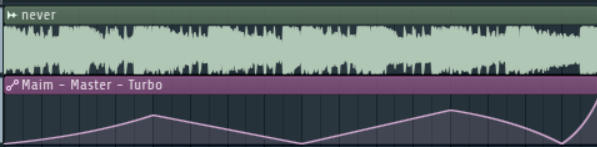
Maim with the Turbo knob automated up and down.
Maim (mentioned above) is capable of doing this; turn the Bitrate knob down, and the Turbo knob up.
The Blade encoder also has a more melodic sound profile than LAME; at low bitrates, it gives a similar effect, but much more “shimmery” (you could probably combine it with a low-pass filter or a de-esser for less ear-piercing results):
Maim with the Blade encoder.
Noisy phone-line/voice call compression#
This is a different compression artifact effect, reminiscent of the kind seen on phone lines or voice calls, and is usually achieved by using Opus at low bitrates, rather than MP3. Compared to MP3 compression, which is more tinny and melodic, this type of compression is more noisy.
Codec with the bitrate set to 8.9kbps.
Maim has Opus compression as well, but I suggest using a dedicated plugin (which is what I did in the above example) - Lese's Codec (free, email required). It also has some neat features like simulating packet loss, which makes it really useful for simulating voice calls.